So Your Store Layout Is Costing You Money (And You Don't Even Know It)
Picture this: you've spent months curating the perfect product selection, training your staff, and perfecting your brand aesthetic — and customers are still walking right past your best-selling items like they're invisible. Meanwhile, that one awkward corner near the emergency exit? Somehow it's generating a traffic jam. Retail is a mysterious beast, and if you've been relying on gut instinct to arrange your store, you're essentially playing chess blindfolded.
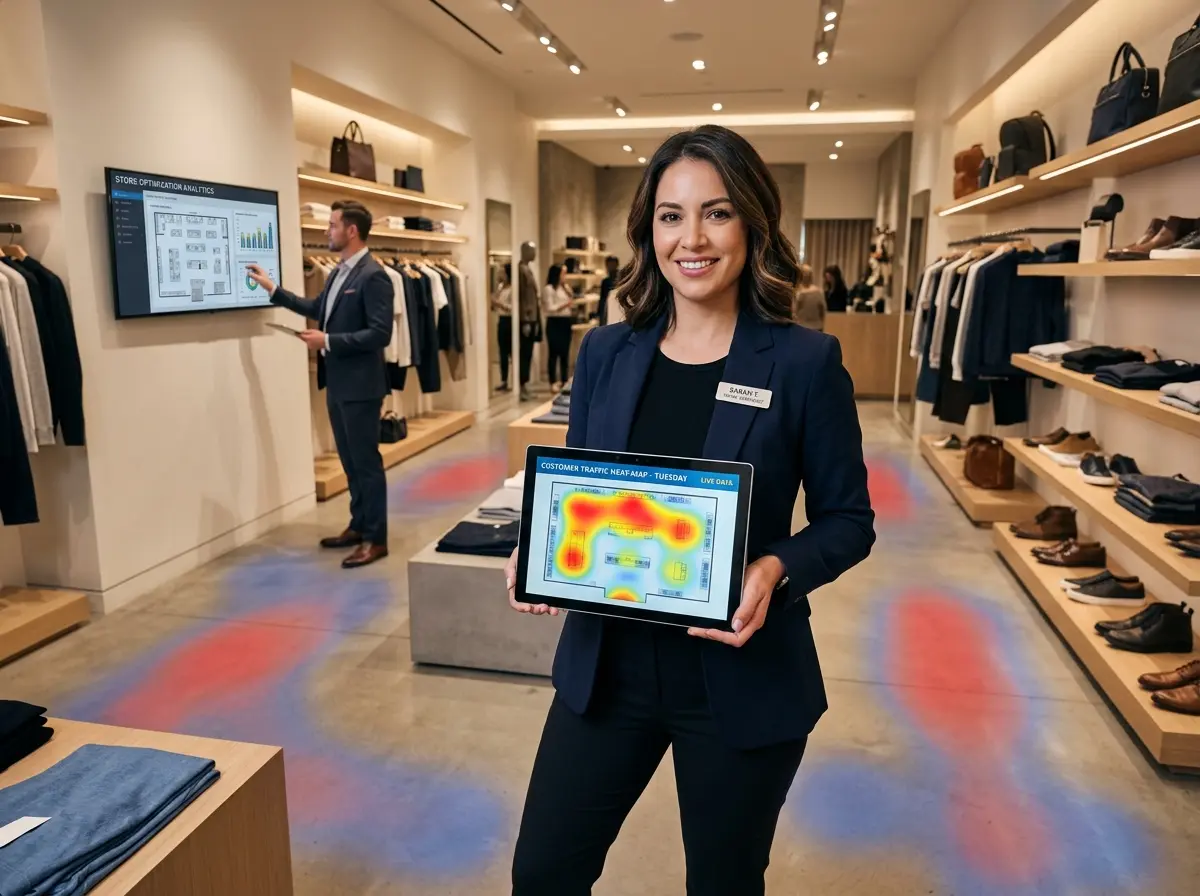
Enter heat-mapping technology — the data-driven solution that takes the guesswork out of store layout optimization. Heat maps track where customers actually walk, pause, linger, and ignore, giving you a visual representation of foot traffic patterns throughout your space. The result? Actionable intelligence that helps you stop arranging your store like it's a game of furniture Tetris and start making strategic decisions backed by real customer behavior.
If you've ever wondered why your promoted product display isn't moving units, or why customers seem magnetically repelled from one side of your store, this post is for you. Let's dig in.
Understanding Heat-Mapping Technology
What Is Retail Heat Mapping, Exactly?
Retail heat mapping is a visual analytics tool that aggregates customer movement data and overlays it onto a floor plan of your store. High-traffic areas show up in warm colors — reds and oranges — while low-traffic zones appear in cooler blues and greens. Think of it as a weather map for human behavior, except instead of predicting rain, it's predicting where your customers will and won't spend their precious attention.
The technology typically works through one of several methods: overhead cameras with computer vision, Wi-Fi and Bluetooth tracking via customer smartphones, infrared sensors, or weight-sensitive flooring systems. Each has its own cost profile and accuracy level, so the right choice depends on your store size, budget, and how deep your analytical obsession runs.
The Data That Actually Matters
Not all heat map data is created equal. When interpreting your results, pay attention to these key metrics:
- Dwell time: How long customers linger in a specific zone. High dwell time near a product display is great. High dwell time near the exit because someone can't find the door handle is less great.
- Traffic flow paths: The natural routes customers take through your store, which often follow predictable patterns (most shoppers instinctively turn right when entering, for example).
- Dead zones: Areas customers consistently avoid — your low-rent retail real estate.
- Hot zones: High-traffic areas that are prime real estate for your most profitable or promotional products.
- Conversion zones: Areas where browsing turns into buying, which should be optimized relentlessly.
Studies have shown that up to 80% of customers turn right when entering a store, yet many retailers still place their highest-margin displays on the left. Heat mapping will confirm these tendencies for your specific location and customer base — because your downtown boutique and a big-box electronics store are not playing the same game.
Choosing the Right Heat-Mapping Solution
For small to mid-sized retailers, entry-level camera-based systems with cloud analytics can run anywhere from a few hundred to a few thousand dollars depending on store size and feature depth. Platforms like Heatmap.com, RetailNext, and Dor offer varying tiers suited to different budgets. If you're a smaller operation just getting started, even a free trial or basic subscription can reveal surprisingly actionable patterns. The key is committing to at least four to six weeks of data collection before drawing conclusions — one unusually busy Saturday does not a trend make.
Turning Heat Map Insights Into Layout Changes That Actually Work
Fixing Dead Zones and Capitalizing on Hot Zones
Once you have your heat map data in hand, the real fun begins — and by fun, we mean the kind of methodical rearranging that makes your staff question your sanity but ultimately drives measurable results. Dead zones are your biggest opportunity. Rather than accepting them as retail purgatory, ask yourself: is this area underperforming because of poor lighting, awkward navigation, proximity to something unpleasant (like the restrooms), or simply because no compelling product has ever been placed there? Sometimes moving a single high-interest item into a dead zone is enough to redirect traffic entirely.
Hot zones, on the other hand, should be treated like premium billboard space. Your highest-margin items, featured promotions, and new arrivals deserve placement in these areas. If your heat map shows that the area just inside the entrance and to the right gets heavy foot traffic every single day, and you currently have a stack of clearance flip-flops there from last summer — well, we need to talk.
Optimizing the Path to Purchase
Effective store layout isn't just about product placement — it's about guiding customers on a journey that maximizes both their experience and your revenue per visit. Heat mapping helps you identify whether your current layout is creating natural cross-selling opportunities or inadvertently funneling everyone toward the checkout without exposure to your full product range.
A common strategy is the "racetrack" or loop layout, which encourages customers to travel through the entire store before reaching the register. If your heat map reveals that customers are cutting straight through the middle and bypassing entire product categories, you may need to introduce subtle navigational cues — strategic fixtures, signage, or even just rearranging gondola shelving to redirect flow. Small adjustments can produce dramatic results: a specialty grocer in Chicago reported a 23% increase in basket size after repositioning its impulse-buy displays based on heat map data.
How Stella Fits Into Your In-Store Strategy
A Smart Store Deserves a Smart Greeter
Heat mapping tells you where your customers go. But what about engaging them once they get there? That's where Stella, the AI robot employee and phone receptionist, comes in. Positioned strategically in one of your identified hot zones — say, that high-traffic area just inside the entrance — Stella proactively greets every customer who walks by, answers product questions, promotes current deals, and even upsells and cross-sells relevant items without ever needing a coffee break or a pep talk.
Beyond the in-store experience, Stella also handles your incoming phone calls 24/7, answering questions about hours, services, and promotions with the same knowledge she uses on the floor. So while your heat map is busy optimizing your physical layout, Stella is making sure no customer interaction — digital, physical, or over the phone — ever falls through the cracks. At $99/month with no upfront hardware costs, she's arguably the most cost-effective square footage you'll ever invest in.
Measuring Results and Iterating Over Time
Set Benchmarks Before You Move a Single Shelf
One of the most common mistakes retailers make when implementing layout changes is failing to document their baseline. Before you rearrange anything, capture your current heat map data, sales figures by product zone, average transaction value, and dwell time metrics. These become your control variables — the "before" in your before-and-after story. Without them, you're essentially renovating your kitchen and then arguing about whether it looked better before without having taken a single photo.
Set a clear testing period — typically 30 to 60 days post-change — and resist the urge to make multiple simultaneous adjustments. If you move three product displays, change your lighting, and rearrange your checkout queue all at once, you'll have no idea which change drove which result. Isolate your variables like the savvy data-driven business owner you're becoming.
The Ongoing Optimization Cycle
Customer behavior isn't static. Seasonal shopping patterns, new product introductions, local events, and even changes in your competitor landscape can all shift how people move through your store. Treat heat mapping as an ongoing practice rather than a one-time project. Schedule quarterly reviews of your heat map data, cross-reference with your sales data, and make iterative adjustments accordingly.
The most successful retailers using this approach develop a continuous improvement mindset — testing a hypothesis, measuring the result, refining the approach, and repeating. Over time, this compounds into a meaningfully better customer experience and a noticeably healthier bottom line. It's not glamorous, but then again, neither is leaving money on the floor of your dead zones.
When to Call In a Professional
If your store is large, your layout changes are complex, or your heat map data is revealing patterns you can't quite interpret, it may be worth engaging a retail consultant who specializes in visual merchandising and space optimization. Many heat-mapping software providers also offer professional services tiers that include expert analysis and recommendations. Think of it as hiring a translator for the language your customers are speaking with their feet.
A Quick Reminder About Stella
Stella is an AI robot employee and phone receptionist built for businesses of all sizes — from bustling retail stores to solo service providers. In-store, she greets customers, answers questions, promotes deals, and collects insights about customer interactions. On the phone, she handles calls 24/7 with the same intelligence and professionalism, forwarding to human staff when needed and never letting a lead go to voicemail without an AI-generated summary and manager notification. At $99/month with no hardware costs upfront, she's as practical as she is impressive.
Your Next Steps Toward a Smarter Store Layout
You don't need a Fortune 500 budget or a PhD in consumer psychology to start optimizing your store layout with heat mapping. You need the right tools, a commitment to letting data lead the way, and the willingness to accept that your current layout — however beloved — might have some significant room for improvement.
Here's how to get started this week:
- Research heat-mapping platforms suited to your store size and budget. Request demos or free trials from two or three providers before committing.
- Establish your baseline metrics — foot traffic by zone, sales by product area, and average transaction value — before making any changes.
- Identify your hot zones and dead zones after four to six weeks of data collection, then prioritize one targeted layout change to test first.
- Measure the impact over 30 to 60 days before moving on to the next adjustment.
- Repeat the cycle quarterly to account for seasonal shifts and evolving customer behavior.
Your store layout is a living, breathing part of your customer experience — and with the right data, you have the power to make it work significantly harder for your business. Stop guessing, start mapping, and watch what happens when your store is finally arranged the way your customers actually want to experience it.